How to Choose the Right Laser Cutter. Part 2
The Evolution of CO₂ Lasers
CO2 lasers have been the backbone of laser cutting since the technology moved out of industrial labs and into small workshops. Early machines — like the iconic K40 — were bulky, required water cooling, and demanded constant mirror alignment, but they proved one thing clearly: a 10,600nm wavelength cuts through wood, acrylic, and non-metallic materials better than anything else on the market.
Over the following decade, brands like Full Spectrum, Boss Laser, and Epilog refined the format — better enclosures, more reliable tubes, and software that didn’t require an engineering degree. Then came the desktop revolution: Glowforge (2018) made CO2 accessible to crafters with a cloud-based, plug-and-play approach, while OMTech and Monport brought traditional open-bed CO₂ machines to hobbyists at a fraction of the previous price. Today, machines like the Gweike Cloud and Thunder Laser Nova sit at the intersection of professional build quality and small-business affordability — proving that CO₂ technology, far from being replaced by diode lasers, has simply grown more accessible, more precise, and more relevant than ever.
A quality CO2 machine can process:
Wood in virtually any form — plywood, MDF, hardwood, and balsa — cutting cleanly through thicknesses that would take a diode laser multiple slow passes. Acrylic is where CO₂ truly shines: the 10,600nm wavelength is absorbed so efficiently that cut edges come out flame-polished and glass-smooth straight off the machine, no post-processing needed. Leather engraves with rich contrast and precise detail; fabric and felt cut without fraying; paper and cardboard slice cleanly at high speed. Beyond organics, CO2 lasers engrave glass, ceramic, and stone with a crisp frosted effect, and can mark painted or coated metals — though bare metal requires a fiber laser. Cork, rubber stamps, foam, and even food-safe materials like chocolate or leather goods round out the list. This material versatility is exactly why CO2 remains the go-to technology for Etsy sellers, sign makers, and small production shops: one machine covers wood decor, acrylic signage, leather goods, and personalized gifts — the four product categories that consistently drive the highest sales volume in the laser cutting niche.
This flexibility allows makers to create a far wider range of products than any single diode machine could support — and it’s why CO2 remains the dominant technology for sellers on Etsy, Amazon Handmade, and craft markets. The machines below represent the most popular CO2 options across different budgets and use cases.
Popular examples include:
Glowforge Pro
Glowforge Pro is the machine that introduced an entire generation of crafters to CO₂ laser cutting — and in 2026 it remains the most beginner-friendly enclosed CO₂ laser on the market, even if the competition has long since caught up on specs. At $5,995–6,995 for the Pro and Pro HD, you’re not buying the most powerful or the fastest machine in this price range; you’re buying the smoothest possible onboarding experience. Place your material, open a browser tab, drag your design onto the camera preview, and press one button — that’s genuinely the entire workflow, no LightBurn configuration, no mirror alignment, no settings grid required. The 45W tube and Pro Passthrough slot handle wood, leather, acrylic, and most craft materials well enough for a healthy Etsy business. The honest trade-offs are significant though: cloud-only software means no internet equals no cutting, the subscription adds ongoing cost, and experienced makers consistently find that competing 55W machines deliver more power and flexibility for thousands less. Glowforge is the right choice when simplicity is the non-negotiable priority — and the wrong choice when specs and value are.
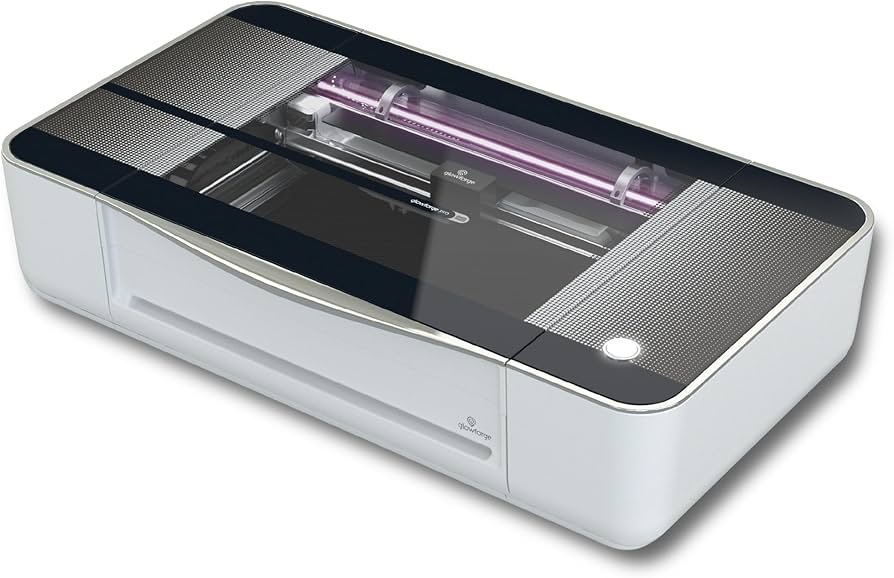
Specifications:
Laser type: CO₂, 45W — the most powerful laser in the Glowforge lineup
Maximum speed: 25,400 mm/min (1,000 inches per minute) — 12x faster than the diode Spark model, 3x faster than the Glowforge Basic
Working area: 279 × 495 mm (11″ × 19.5″)
Material thickness: up to 13mm (0.5″) for standard cutting; unlimited length via the Pro Passthrough slot
Pro Passthrough: proprietary slot for feeding oversized sheets — print, slide, repeat; ideal for signs, furniture, and long decorative panels
HD optics: upgraded lens system and image processing for sharper alignment and cleaner cuts compared to the standard Pro
Preview Mode: HD-exclusive feature that shows the final result on the material in real time before you hit print — saves both time and material
Live Camera Preview HD: HD lid camera scans the entire work area, allowing precise design positioning directly on the material
Autofocus: low-power laser scans the material surface to detect exact height automatically — no manual focus adjustment needed
Cooling: closed-loop solid-state cooling system designed for all-day continuous operation
Cut & engrave materials: wood, plywood, acrylic (including clear), leather, fabric, paper, cardboard, cork, rubber, Delrin, Mylar, Corian, food
Engrave-only materials: glass, stone, slate, marble, ceramic tile, anodized aluminum, titanium, coated stainless steel
Glowforge is sold exclusively through its own website, glowforge.com
OMTech Polar Lite 55W
The enPopular among budget-conscious makers. Closed evolution of the D1 Pro.
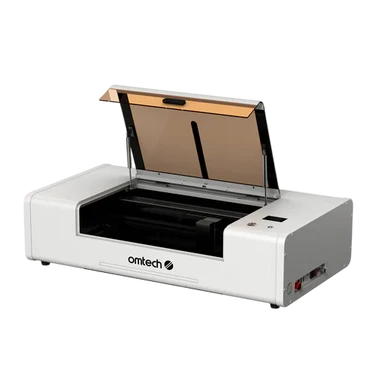
Specifications:
Laser type: CO₂, 55W glass tube, 10,600nm wavelength
Working area: 510 × 305 mm (20″ × 12″) — removable work bed with front and rear pass-through slots for oversized materials
Maximum speed: 500 mm/s
Precision: 0.025 mm (0.001″)
Autofocus: one-click automatic focusing via software — no manual adjustment needed
Cooling: built-in closed-loop water chiller (0.5 gal / 1.9L tank) — no external water reservoir required
Camera: 5MP panoramic camera for real-time design positioning on material
Air assist: built-in automatic air assist pump
Connectivity: Wi-Fi, USB, Ethernet
Software: LightBurn (natively supported) + RDWorks V8 included; supports SVG, DXF, JPG, PNG, BMP, TIF
Cut materials: wood (up to 15mm), acrylic (up to 25mm), leather, fabric, cardboard, foam, rubber
Engrave-only materials: glass, stone, slate, ceramic, coated metals, marble
Rotary attachment: included — for tumblers, mugs, and cylindrical objects
Check current price on Amazon or the official OMTech store
OMTech Polar
The Polar 2 isn’t just an incremental update — it’s a generational leap. The working area grows from 20″×12″ to 28″×14″, making it 50–60% larger than most desktop CO₂ machines. More importantly, buyers now choose between two laser configurations: a 70W glass tube for raw cutting power, or a 50W RF tube — the real game-changer. The RF version delivers engraving speeds up to 2,000 mm/s, a 30,000-hour tube lifespan, 1000 DPI resolution down to 1×1mm detail, and air cooling that eliminates water maintenance entirely. Material height support jumps to 5 inches, opening the door to thicker stock. The one trade-off: Polar 2 drops the pass-through slot of the Polar Lite, making it a fully enclosed machine only.
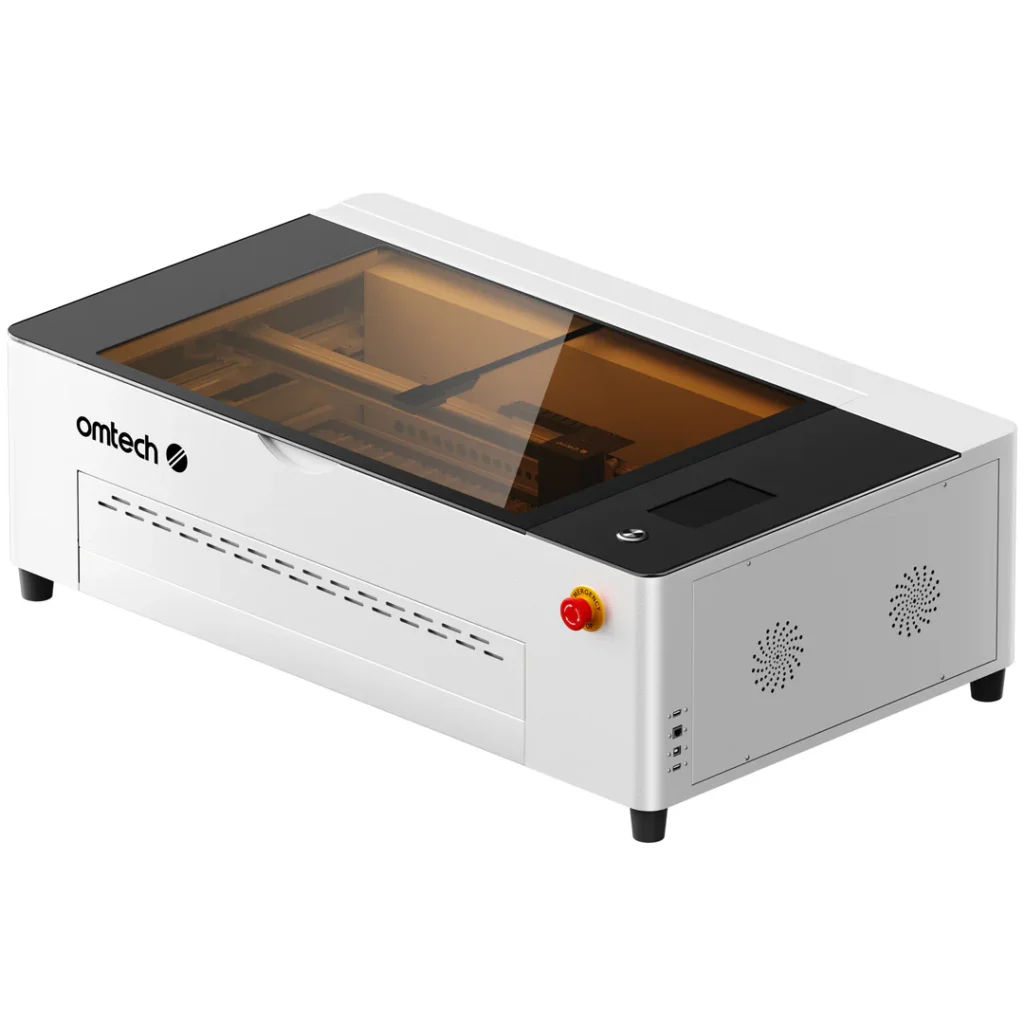
Specifications
Laser type: choice of two configurations — 70W CO₂ glass tube (closed-loop water cooling) or 50W RF tube (air-cooled, maintenance-free)
Working area: 710 × 360 mm (28″ × 14″) — 50–60% larger than most desktop CO₂ lasers; supports materials up to 125mm (5″) thick
Maximum speed: up to 1,000 mm/s
Autofocus: one-touch automatic focusing for consistent results across every job
Cooling: 70W Glass version — closed-loop water cooling system (4.3L tank) with automatic shutoff if flow is interrupted; 50W RF version — compact air-cooled system, no water maintenance required
RF tube service life: up to 30,000 hours at 40% power; rechargeable/reactivatable unlike standard glass tubes
Glass tube service life: ~10,000 hours at 40% power; non-rechargeable consumable
Camera: built-in HD camera for real-time preview and precise design positioning
Air assist: integrated, delivers 14–17 L/min airflow for clean, sharp cuts
Ventilation: internal fan and ducting system for efficient smoke and dust clearance
Rotary attachment: included as standard — for tumblers, mugs, and cylindrical engraving out of the box
Connectivity: LightBurn natively supported
Cut materials: wood (up to 22mm in one pass with 70W), acrylic, leather, fabric, rubber, cardboard, coated metals
Engrave-only materials: glass, stone, slate, marble, ceramic tile
Check current price on the official OMTech store
Monport 40W Pro
Monport 40W Pro is the most accessible entry point into genuine CO₂ laser cutting — a compact open-frame machine that punches well above its ~$539 price tag by shipping with native LightBurn compatibility, built-in air assist, a red dot guidance system, and professional-grade metal rails right out of the box. Unlike bare-bones K40 clones that require immediate upgrades just to become usable, the Monport 40W Pro is genuinely ready to work from day one. The 40W CO₂ tube handles wood, acrylic, leather, and glass cleanly, with a 12″×8″ work area that’s tight but sufficient for keychains, ornaments, coasters, and small signs — exactly the product categories that drive the most Etsy volume. The honest trade-off: no enclosure means ventilation is your responsibility, the work area won’t fit larger projects, and 40W will feel limiting if your business grows. Think of it less as a long-term production machine and more as the smartest possible first CO₂ laser — the one that teaches you the workflow before you invest in something bigger.
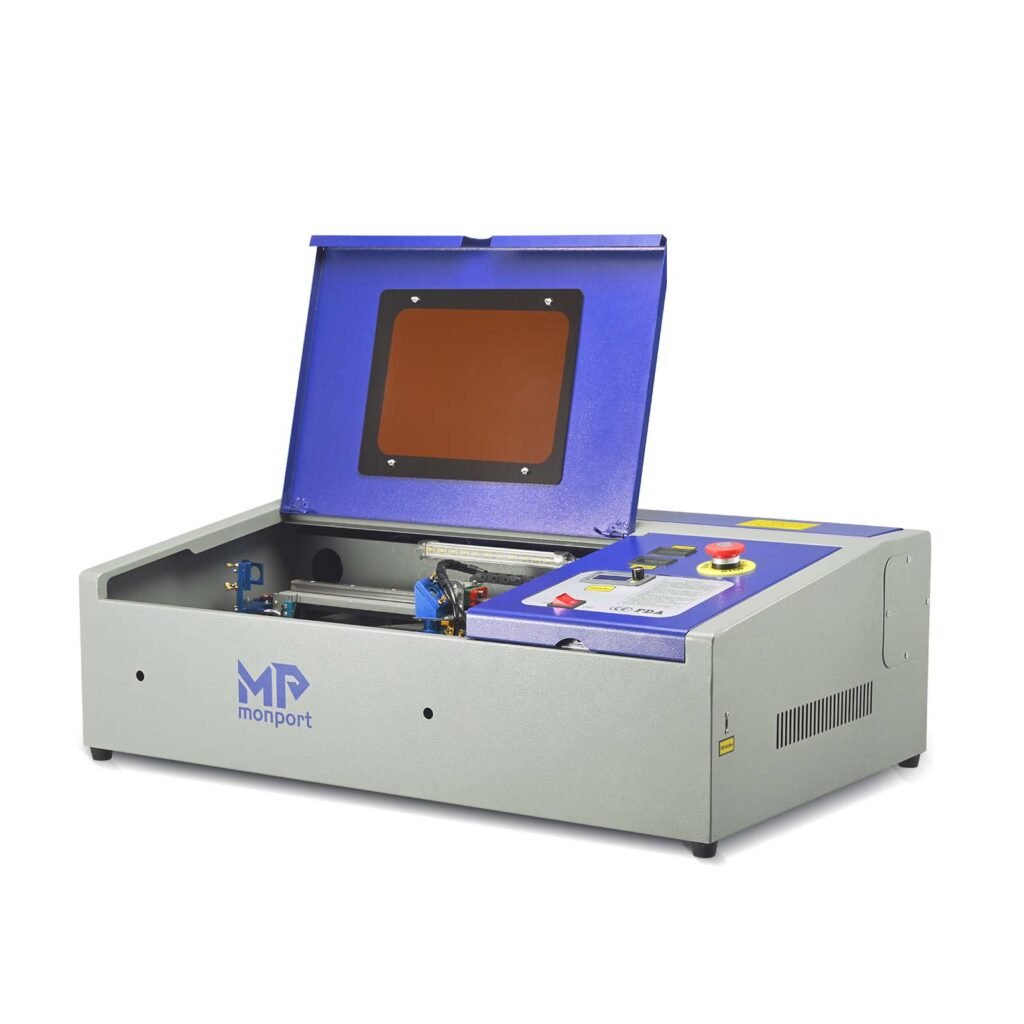
Specifications
Laser type: CO₂, 40W glass tube, wavelength 10,600 nm
Working area: 305 × 200 mm (12“ × 8”) — compact, classic K40 format
Maximum speed: 350 mm/s
Engraving accuracy: 0.25 mm (0.01″)
Maximum cutting depth: 10 mm (0.4″)
Laser head: adjustable 19 mm, with Red Dot Guidance for precise cut positioning before starting
Work table (dual): stabilizing clamp for non-standard objects + ventilated platform for standard materials
Air assist: built-in — reduces charring and scorching when engraving wood
Cooling: water-based — compact pump and built-in hoses included; requires distilled water, maintains a tube temperature of 16–21°C
Ventilation: built-in fan + exhaust port to vent smoke outside; open frame—no enclosed housing
Connectivity: USB; compatible with LightBurn (natively, updated control board) and LaserGRBL
Materials for cutting: wood, MDF (3 mm in a single pass), acrylic, leather, fabric, paper, cardboard, rubber, plastic
Materials for engraving: glass, ceramics, slate, coated metals
Check current price on the official Monport Tech Inc store
xTool P2S 55W CO2 Laser Cutter
xTool P2S 55W is the machine that redefined what a desktop CO₂ laser could be. At around $4,000–5,000, it sits at the premium end of the enclosed desktop segment — but what you’re paying for is a genuinely different workflow: dual 16MP cameras (panoramic + close-range), LiDAR autofocus, AutoPassthrough for materials up to 118″ long, and 3D curve engraving on cylindrical surfaces, all wrapped in a polished, fully enclosed Class IV cabinet. The 55W tube cuts 18mm hardwood and 20mm acrylic in a single pass at 600mm/s — fast enough that serious Etsy sellers consistently report meaningful throughput gains over lower-powered machines. Where the OMTech Polar Lite asks you to bring your own LightBurn skills and hands-on setup approach, the P2S does the heavy lifting through automation and smart camera positioning — making it the natural upgrade path for creators who’ve outgrown manual workflows and need the machine to keep up with their order queue.
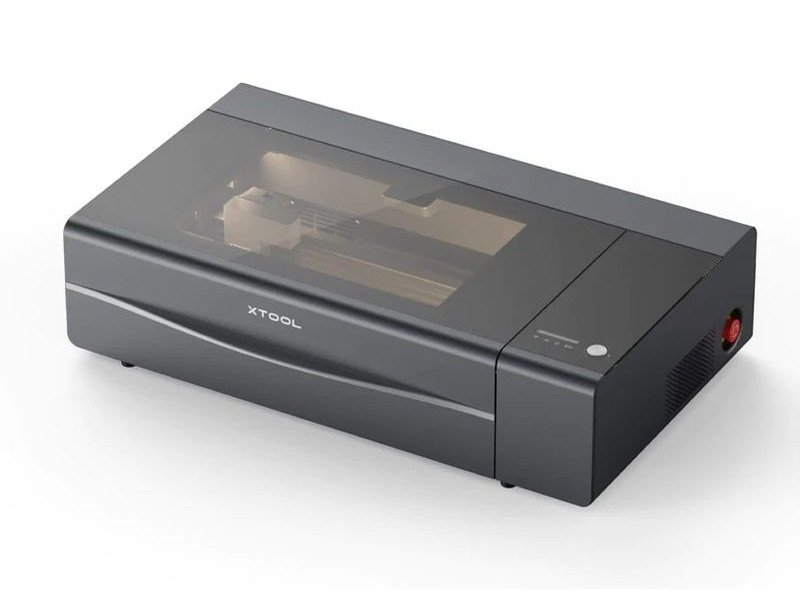
Specifications
Laser type: CO₂, 55 W glass tube, wavelength 10,600 nm
Working area: 600 × 305 mm (23.6“ × 12”) — table size 680 × 360 mm (26.7“ × 14.1”)
Maximum speed: 600 mm/s (X-axis acceleration: 6,400 mm/s²)
Accuracy: 0.01 mm, spot size 0.15 × 0.2 mm, camera resolution 1,000 DPI Tube lifespan: 6,000–8,000 hours Single-pass cutting capabilities: 18 mm black walnut, 20 mm of acrylic of any color, including transparent—5 times faster than a 40 W diode laser.
Dual 16 MP cameras: a panoramic camera for previewing the entire work area + a close-up camera next to the laser head for precise alignment of small objects;
positioning accuracy of 0.3 mm at a resolution of 1000 DPI
AutoPassthrough™: automatic processing of materials up to 3 meters (118″) in length—conveyor system3D Curve™
Engraving: automatic creation of 3D models for engraving on curved surfaces and cylinders
Autofocus: motorized Z-axis with a 75 mm travel; LiDAR sensor for precise determination of material height
The xTool P2S and OMTech Polar Lite represent two different philosophies of CO₂ laser ownership. The Polar Lite gives you maximum CO₂ capability for minimum spend, with full manual control through LightBurn — ideal for makers who know what they’re doing and want to keep costs down. The P2S bets on smart automation: dual cameras, AutoPassthrough, and 3D cylinder engraving that saves meaningful time on every single job. For an Etsy seller processing high order volumes, that price difference pays for itself in positioning accuracy and throughput alone. Choose the Polar Lite to get started. Choose the P2S when your order queue outgrows your machine.
Gweike Cloud 50W CO₂
Gweike Cloud 50W is one of the most compelling budget CO₂ lasers on the market — a fully enclosed desktop machine with a genuine 50W tube, built-in liquid cooling, 5MP camera, and native LightBurn support, all for around $1,500. It shares nearly identical engineering with the OMTech Polar, making it the cheaper sibling of one of the most popular desktop CO₂ lasers in the hobbyist space. For Etsy sellers stepping up from a diode laser, it delivers everything that matters: real CO₂ cutting power, transparent and white acrylic capability, and fully offline operation that doesn’t depend on anyone’s servers.
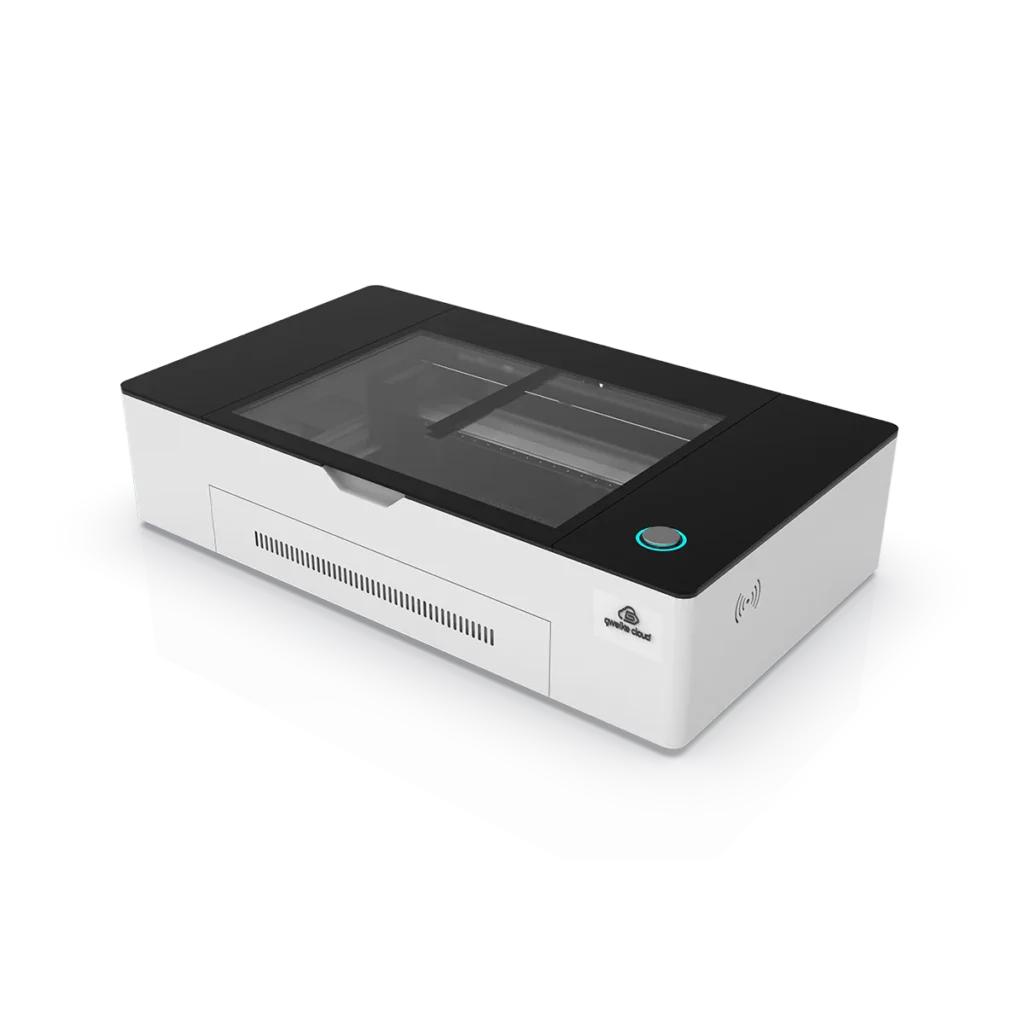
Specifications
Laser type: CO₂, 50W glass tube, wavelength 10,600 nm; the tube is mounted on the Y-axis of the gantry
Working area: 510 × 300 mm (20“ × 12”) — virtually identical to the OMTech Polar
Maximum speed: 600 mm/s along the X-axis; slower along the Y-axis due to the weight of the tube
Accuracy: 0.025 mm (0.001″)
Single-pass cutting capabilities: wood up to 20 mm, acrylic up to 15 mm (including transparent and white — unlike diode lasers)
Cooling: built-in closed-loop liquid cooling system with a heat exchanger — no external chiller or bucket of water required
Camera: 5MP wide-angle—for precise design positioning on the material, real-time operation monitoring, and pattern extraction from the object’s surface
Autofocus: Yes—automatically determines focus, speed, and power via the material’s QR code or cloud-based software
Air assist: Built-in—for lens protection and clean cuts
Ventilation: built-in exhaust fan; optional—three-stage filter (HEPA + activated carbon) for indoor use
Guides: Hiwin industrial linear rails on all three axes—ensure stability at high speeds
Pass-through: a slot in the rear panel for materials that exceed the working area in length
Connectivity: Wi-Fi, Ethernet (LAN), USB
Software: three options—Gweike Cloud Online (cloud-based, no installation required), Gweike Cloud Offline, LightBurn (native support); formats: SVG, DXF, JPG, PNG, BMP, and others
Cutting materials: wood, MDF, acrylic (all colors, including transparent), leather, fabric, cardboard, paper,
The Gweike Cloud and OMTech Polar 350 are essentially the same machine with different logos. They share the same design, the same Hiwin rails, the same 5MP camera, and a built-in chiller. The Gweike is slightly cheaper, while OMTech offers better support in English and a more active community in the U.S. Some users have noted inconsistent engraving quality and difficulties with configuration in LightBurn.
Who Should Buy a CO2 Laser?
The honest answer is: not everyone who thinks they should. After years of working with both diode and CO₂ machines, the single biggest mistake I see beginners make is jumping straight to CO₂ because it sounds more professional. If you’re still figuring out whether laser cutting is even the right business for you, start with a diode laser first — learn the software, test your product ideas, validate that customers actually want what you’re making.
Once you know your niche, CO₂ becomes a near-essential upgrade. The moment you need to cut clear acrylic signs, engrave glass or slate, produce [layered wood wall art], cut [intricate mandala designs], or fulfill more orders per hour than your diode machine can handle — CO₂ is the only technology that solves all of those problems cleanly. The jump in material versatility alone pays for the machine faster than most people expect. With the right SVG files you can build an entire product line around personalized wooden gifts, laser-cut wedding decorations, acrylic keychains, ornamental home decor, or custom business signage — all categories where CO₂ lasers consistently outperform diode machines on edge quality, speed, and material range.
The one thing I’d warn every new CO₂ buyer about: factor in ventilation before you factor in the machine itself. A $1,800 laser sitting in a poorly ventilated space is a health hazard and a fire risk. Sort your exhaust setup first, then buy the machine — not the other way around.